Alcatel OmniStack OS6250-24M - сброс в дефолт

  • user warning: Table './muffsql1/cache_filter' is marked as crashed and should be repaired query: SELECT data, created, headers, expire, serialized FROM cache_filter WHERE cid = '2:9bd05d6d1a20d6de52677c7048b51116' in /usr/local/www/muff.kiev.ua/includes/cache.inc on line 27.
  • user warning: Table './muffsql1/cache_filter' is marked as crashed and should be repaired query: UPDATE cache_filter SET data = '<p class=\"rtecenter\"><img alt=\"Alcatel logo\" src=\"http://muff.kiev.ua/files/Alcatel-omni.jpg\" style=\"height:105px; width:140px\" /></p>\n<p class=\"rtejustify\">В очередной раз попала в руки железка бывшая в эксплуатации. Реквизитов доступа к ней нету,&nbsp;а запускать в работу - нужно. Соответвенно воспользуемся возможностью сброса конфигурации.</p>\n<p class=\"rtejustify\">Для этого подключаемся к коммутатору через консольный порт <strong>RS-232</strong>. Консольный кабель выглядит следующим образом:</p>\n<p class=\"rtecenter\"><img alt=\"Alcatel консольный кабель\" src=\"http://muff.kiev.ua/files/concole-alcatel.png\" style=\"height:70px; width:302px\" /></p>\n<p class=\"rtejustify\">Ну и распиновка кабеля,&nbsp;если такового нету в наличии:</p>\n<p class=\"rtejustify\">&nbsp;</p>\n<table align=\"center\" border=\"1\" cellpadding=\"1\" cellspacing=\"1\" style=\"width:20px\">\n<tbody>\n<tr>\n<td class=\"rtecenter\">RJ45</td>\n<td class=\"rtecenter\">DB9</td>\n</tr>\n<tr>\n<td class=\"rtecenter\">1</td>\n<td class=\"rtecenter\">7</td>\n</tr>\n<tr>\n<td class=\"rtecenter\">2</td>\n<td class=\"rtecenter\">4</td>\n</tr>\n<tr>\n<td class=\"rtecenter\">3</td>\n<td class=\"rtecenter\">3</td>\n</tr>\n<tr>\n<td class=\"rtecenter\">4</td>\n<td class=\"rtecenter\">5</td>\n</tr>\n<tr>\n<td class=\"rtecenter\">5</td>\n<td class=\"rtecenter\">-</td>\n</tr>\n<tr>\n<td class=\"rtecenter\">6</td>\n<td class=\"rtecenter\">2</td>\n</tr>\n<tr>\n<td class=\"rtecenter\">7</td>\n<td class=\"rtecenter\">6</td>\n</tr>\n<tr>\n<td class=\"rtecenter\">8</td>\n<td class=\"rtecenter\">8</td>\n</tr>\n</tbody>\n</table>\n<p class=\"rtecenter\">&nbsp;</p>\n<p class=\"rtejustify\">Запускаем утилиту <strong>minicom</strong>. Параметры коннекта - <strong>9600 8N1</strong>. Подаем питание на коммутатор и готовимся нажать в нужный момент клавишу &quot;<strong>s</strong>&quot;. Дожидаемся приглашения и жмем &quot;<strong>s</strong>&quot;:</p>\n<table border=\"1\" cellpadding=\"1\" cellspacing=\"1\" style=\"width:100%\">\n<tbody>\n<tr>\n<td>\n<pre>\nAOS BootSelector Version: 6.6.1.636.R01\nCreation Date: Oct 10 2009 11:49:10.</pre><pre>\nPress x to choose XMODEM...</pre><pre>\n<span style=\"color:#ff0000\">Press s to STOP AT MINIBOOT...</span></pre></td>\n</tr>\n</tbody>\n</table>\n<p class=\"rtejustify\">Если успели, то будет предупреждающая надпись:</p>\n<table border=\"1\" cellpadding=\"1\" cellspacing=\"1\" style=\"width:100%\">\n<tbody>\n<tr>\n<td>\n<pre>\nS Key was pressed</pre></td>\n</tr>\n</tbody>\n</table>\n<p class=\"rtejustify\">Коммутатор продолжит загрузку, войдет в режим <strong>Miniboot</strong> и выведет приглашение командной строки:</p>\n<table border=\"1\" cellpadding=\"1\" cellspacing=\"1\" style=\"width:100%\">\n<tbody>\n<tr>\n<td>\n<pre>\nWARNING: Stopping in miniboot as directed by boot flags...\n[Miniboot]-&gt;</pre></td>\n</tr>\n</tbody>\n</table>\n<p class=\"rtejustify\">Если не успели - дожидайтесь полной загрузки коммутатора и перегружайте его снова. Во время загрузки перегружать не стоит - это чревато повреждением прошивки.</p>\n<p class=\"rtejustify\">Итак,&nbsp;в режиме <strong>Miniboot</strong> можно ознакомиться с его возможностями,&nbsp;воспользовавшись командой <strong>help</strong>:</p>\n<table border=\"1\" cellpadding=\"1\" cellspacing=\"1\" style=\"width:100%\">\n<tbody>\n<tr>\n<td>\n<pre>\n[Miniboot]-&gt; <span style=\"color:#ff0000\"><strong>help</strong></span></pre><pre>\nhelp Print this list\nioHelp Print I/O utilities help info\ndbgHelp Print debugger help info\nnfsHelp Print nfs help info\nnetHelp Print network help info\nspyHelp Print task histogrammer help info\ntimexHelp Print execution timer help info\nh [n] Print (or set) shell history\ni [task] Summary of tasks&#39; TCBs\nti task Complete info on TCB for task\nsp adr,args... Spawn a task, pri=100, opt=0x19, stk=20000\ntaskSpawn name,pri,opt,stk,adr,args... Spawn a task\ntd task Delete a task\nts task Suspend a task\ntr task Resume a task\nd [adr[,nunits[,width]]] Display memory\nm adr[,width] Modify memory\nmRegs [reg[,task]] Modify a task&#39;s registers interactively\npc [task] Return task&#39;s program counter\n\niam &quot;user&quot;[,&quot;passwd&quot;] Set user name and passwd\nwhoami Print user name\ndevs List devices\nld [syms[,noAbort][,&quot;name&quot;]] Load stdin, or file, into memory\n (syms = add symbols to table:\n -1 = none, 0 = globals, 1 = all)\nlkup [&quot;substr&quot;] List symbols in system symbol table\nlkAddr address List symbol table entries near address\ncheckStack [task] List task stack sizes and usage\nprintErrno value Print the name of a status value\nperiod secs,adr,args... Spawn task to call function periodically\nrepeat n,adr,args... Spawn task to call function n times (0=forever)\nversion Print VxWorks version info, and boot line</pre><pre>\nNOTE: Arguments specifying &#39;task&#39; can be either task ID or name.</pre><pre>\nvalue = 1 = 0x1</pre></td>\n</tr>\n</tbody>\n</table>\n<p class=\"rtejustify\">Просмотрим содержимое файловой системы,&nbsp;воспользовавшись командой <strong>ls</strong>:</p>\n<table border=\"1\" cellpadding=\"1\" cellspacing=\"1\" style=\"width:100%\">\n<tbody>\n<tr>\n<td>\n<pre>\n[Miniboot]-&gt; <span style=\"color:#ff0000\"><strong>ls</strong></span>\nworking\ncertified\nboot.params\nswlog1.log\nswlog2.log\nswitch\ninstalled\nboot.slot.cfg\nnetwork\nboot.cfg.1.err\nasc.1.snap\nfpgaupdate.status\nvalue = 0 = 0x0</pre></td>\n</tr>\n</tbody>\n</table>\n<p class=\"rtejustify\">Необходимо перейти в каталог <strong>network</strong>:</p>\n<table border=\"1\" cellpadding=\"1\" cellspacing=\"1\" style=\"width:100%\">\n<tbody>\n<tr>\n<td>\n<pre>\n[Miniboot]-&gt; <span style=\"color:#ff0000\"><strong>cd network</strong></span>\nundefined symbol: network</pre></td>\n</tr>\n</tbody>\n</table>\n<p class=\"rtejustify\">Не тут то было... Как оказалось,&nbsp;в режиме <strong>Miniboot</strong> необходимо имена файлов и каталогов экранировать двойными кавычками:</p>\n<table border=\"1\" cellpadding=\"1\" cellspacing=\"1\" style=\"width:100%\">\n<tbody>\n<tr>\n<td>\n<pre>\n[Miniboot]-&gt; <span style=\"color:#ff0000\"><strong>cd &quot;network&quot;</strong></span>\nvalue = 0 = 0x0</pre></td>\n</tr>\n</tbody>\n</table>\n<p class=\"rtejustify\">После просмотра содержимого каталога,&nbsp;необходимо найти файл <strong>userTable5</strong> в котором и хранится информация о учетных записях:</p>\n<table border=\"1\" cellpadding=\"1\" cellspacing=\"1\" style=\"width:100%\">\n<tbody>\n<tr>\n<td>\n<pre>\n[Miniboot]-&gt; <span style=\"color:#ff0000\"><strong>ls\n</strong></span>.\n..\nuserTable5\nlockoutSetting\npolicy.cfg\nssh_host_dsa_key\nssh_host_dsa_key.pub\nvalue = 0 = 0x0</pre></td>\n</tr>\n</tbody>\n</table>\n<p class=\"rtejustify\">Удалим этот файл:</p>\n<table border=\"1\" cellpadding=\"1\" cellspacing=\"1\" style=\"width:100%\">\n<tbody>\n<tr>\n<td>\n<pre>\n[Miniboot]-&gt; <span style=\"color:#ff0000\"><strong>rm &quot;userTable5&quot;\n</strong></span>value = 0 = 0x0</pre></td>\n</tr>\n</tbody>\n</table>\n<p class=\"rtejustify\">После этого перезагружаем коммутатор, воспользовавшись командой <strong>reboot</strong>:</p>\n<table border=\"1\" cellpadding=\"1\" cellspacing=\"1\" style=\"width:100%\">\n<tbody>\n<tr>\n<td>\n<pre>\n[Miniboot]-&gt; <span style=\"color:#ff0000\"><strong>reboot</strong></span>\nmgi0 Interface Down\nmgi0 Interface Stopped\nWARNING: &quot;sysResetHardwareFlag&quot; flag is SET, forcing CMM board reset.</pre></td>\n</tr>\n</tbody>\n</table>\n<p class=\"rtejustify\">В результате имеем коммутатор с сохраненной конфигурацией,&nbsp;но со стандартным логином и паролем: username: <span style=\"color:#ff0000\"><strong>admin</strong></span> password: <span style=\"color:#ff0000\"><strong>switch</strong></span>.</p>\n<p class=\"rtejustify\">Если же необходимо также удалить и конфигурацию коммутатора,&nbsp;то необходимо удалить файлы <strong>/working/boot.cfg</strong> и <strong>/certified/boot.cfg</strong>. Перегружаемся и заходим снова в режим <strong>Miniboot</strong>. Команды удаления файлов конфигурации:</p>\n<table border=\"1\" cellpadding=\"1\" cellspacing=\"1\" style=\"width:100%\">\n<tbody>\n<tr>\n<td>\n<pre>\n[Miniboot]-&gt; <span style=\"color:#ff0000\"><strong>cd &quot;working&quot;\n</strong></span>value = 0 = 0x0\n[Miniboot]-&gt; <span style=\"color:#ff0000\"><strong>rm &quot;boot.cfg&quot;\n</strong></span>value = 0 = 0x0\n[Miniboot]-&gt; <span style=\"color:#FF0000\"><strong>cd &quot;..&quot;</strong></span>\nvalue = 0 = 0x0\n[Miniboot]-&gt; <span style=\"color:#ff0000\"><strong>cd &quot;certified&quot;\n</strong></span>value = 0 = 0x0\n[Miniboot]-&gt; <span style=\"color:#ff0000\"><strong>rm &quot;boot.cfg&quot;\n</strong></span>value = 0 = 0x0</pre></td>\n</tr>\n</tbody>\n</table>\n<p class=\"rtejustify\">В принципе,&nbsp;можно удалить файлы и в обычном режиме. Но тогда имена файлов не нужно заключать в кавычки!</p>\n', created = 1767333100, expire = 1767419500, headers = '', serialized = 0 WHERE cid = '2:9bd05d6d1a20d6de52677c7048b51116' in /usr/local/www/muff.kiev.ua/includes/cache.inc on line 112.
  • user warning: Table './muffsql1/cache_filter' is marked as crashed and should be repaired query: SELECT data, created, headers, expire, serialized FROM cache_filter WHERE cid = '2:07243fc0252056071eaa62af8c18d662' in /usr/local/www/muff.kiev.ua/includes/cache.inc on line 27.
  • user warning: Table './muffsql1/cache_filter' is marked as crashed and should be repaired query: UPDATE cache_filter SET data = '<p class=\"rtecenter\"><a class=\"thickbox\" href=\"/files/imagepicker/1/wake_up_ua.png\"><img alt=\"Вставай, Україно!\" class=\"imgp_img\" src=\"/files/imagepicker/1/thumbs/wake_up_ua.png\" style=\"height:200px; width:150px\" /></a></p>\n', created = 1767333100, expire = 1767419500, headers = '', serialized = 0 WHERE cid = '2:07243fc0252056071eaa62af8c18d662' in /usr/local/www/muff.kiev.ua/includes/cache.inc on line 112.
  • user warning: Table './muffsql1/cache_filter' is marked as crashed and should be repaired query: SELECT data, created, headers, expire, serialized FROM cache_filter WHERE cid = '3:cc913d232116f0426090404133377d88' in /usr/local/www/muff.kiev.ua/includes/cache.inc on line 27.
  • user warning: Table './muffsql1/cache_filter' is marked as crashed and should be repaired query: SELECT data, created, headers, expire, serialized FROM cache_filter WHERE cid = '2:d9a86123bfcbc57878743027b584400b' in /usr/local/www/muff.kiev.ua/includes/cache.inc on line 27.
  • user warning: Table './muffsql1/cache_filter' is marked as crashed and should be repaired query: UPDATE cache_filter SET data = '<p class=\"rtecenter\"><a href=\"http://muff.kiev.ua/rss.xml\"><img alt=\"RSS\" width=\"160\" height=\"60\" src=\"http://muff.kiev.ua/files/muf-rss.png\" /></a></p>\n', created = 1767333100, expire = 1767419500, headers = '', serialized = 0 WHERE cid = '2:d9a86123bfcbc57878743027b584400b' in /usr/local/www/muff.kiev.ua/includes/cache.inc on line 112.
  • user warning: Table './muffsql1/cache_filter' is marked as crashed and should be repaired query: SELECT data, created, headers, expire, serialized FROM cache_filter WHERE cid = '3:39649256b636e3d5ded656bc52bd8c01' in /usr/local/www/muff.kiev.ua/includes/cache.inc on line 27.
Версия для печатиОтправить другуPDF version

Alcatel logo

В очередной раз попала в руки железка бывшая в эксплуатации. Реквизитов доступа к ней нету, а запускать в работу - нужно. Соответвенно воспользуемся возможностью сброса конфигурации.

Для этого подключаемся к коммутатору через консольный порт RS-232. Консольный кабель выглядит следующим образом:
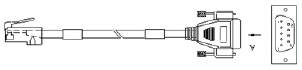
Alcatel консольный кабель

Ну и распиновка кабеля, если такового нету в наличии:


RJ45 DB9
1 7
2 4
3 3
4 5
5 -
6 2
7 6
8 8


Запускаем утилиту minicom. Параметры коннекта - 9600 8N1. Подаем питание на коммутатор и готовимся нажать в нужный момент клавишу "s". Дожидаемся приглашения и жмем "s":

AOS BootSelector Version: 6.6.1.636.R01
Creation Date: Oct 10 2009 11:49:10.
Press x to choose XMODEM...
Press s to STOP AT MINIBOOT...

Если успели, то будет предупреждающая надпись:

S Key was pressed

Коммутатор продолжит загрузку, войдет в режим Miniboot и выведет приглашение командной строки:

WARNING: Stopping in miniboot as directed by boot flags...
[Miniboot]->

Если не успели - дожидайтесь полной загрузки коммутатора и перегружайте его снова. Во время загрузки перегружать не стоит - это чревато повреждением прошивки.

Итак, в режиме Miniboot можно ознакомиться с его возможностями, воспользовавшись командой help:

[Miniboot]-> help
help                           Print this list
ioHelp                         Print I/O utilities help info
dbgHelp                        Print debugger help info
nfsHelp                        Print nfs help info
netHelp                        Print network help info
spyHelp                        Print task histogrammer help info
timexHelp                      Print execution timer help info
h         [n]                  Print (or set) shell history
i         [task]               Summary of tasks' TCBs
ti        task                 Complete info on TCB for task
sp        adr,args...          Spawn a task, pri=100, opt=0x19, stk=20000
taskSpawn name,pri,opt,stk,adr,args... Spawn a task
td        task                 Delete a task
ts        task                 Suspend a task
tr        task                 Resume a task
d         [adr[,nunits[,width]]] Display memory
m         adr[,width]          Modify memory
mRegs     [reg[,task]]         Modify a task's registers interactively
pc        [task]               Return task's program counter

iam       "user"[,"passwd"]     Set user name and passwd
whoami                         Print user name
devs                           List devices
ld        [syms[,noAbort][,"name"]] Load stdin, or file, into memory
                               (syms = add symbols to table:
                               -1 = none, 0 = globals, 1 = all)
lkup      ["substr"]         List symbols in system symbol table
lkAddr    address              List symbol table entries near address
checkStack  [task]             List task stack sizes and usage
printErrno  value              Print the name of a status value
period    secs,adr,args... Spawn task to call function periodically
repeat    n,adr,args...    Spawn task to call function n times (0=forever)
version                        Print VxWorks version info, and boot line
NOTE:  Arguments specifying 'task' can be either task ID or name.
value = 1 = 0x1

Просмотрим содержимое файловой системы, воспользовавшись командой ls:

[Miniboot]-> ls
working
certified
boot.params
swlog1.log
swlog2.log
switch
installed
boot.slot.cfg
network
boot.cfg.1.err
asc.1.snap
fpgaupdate.status
value = 0 = 0x0

Необходимо перейти в каталог network:

[Miniboot]-> cd network
undefined symbol: network

Не тут то было... Как оказалось, в режиме Miniboot необходимо имена файлов и каталогов экранировать двойными кавычками:

[Miniboot]-> cd "network"
value = 0 = 0x0

После просмотра содержимого каталога, необходимо найти файл userTable5 в котором и хранится информация о учетных записях:

[Miniboot]-> ls
.
..
userTable5
lockoutSetting
policy.cfg
ssh_host_dsa_key
ssh_host_dsa_key.pub
value = 0 = 0x0

Удалим этот файл:

[Miniboot]-> rm "userTable5"
value = 0 = 0x0

После этого перезагружаем коммутатор, воспользовавшись командой reboot:

[Miniboot]-> reboot
mgi0 Interface Down
mgi0 Interface Stopped
WARNING: "sysResetHardwareFlag" flag is SET, forcing CMM board reset.

В результате имеем коммутатор с сохраненной конфигурацией, но со стандартным логином и паролем: username: admin password: switch.

Если же необходимо также удалить и конфигурацию коммутатора, то необходимо удалить файлы /working/boot.cfg и /certified/boot.cfg. Перегружаемся и заходим снова в режим Miniboot. Команды удаления файлов конфигурации:

[Miniboot]-> cd "working"
value = 0 = 0x0
[Miniboot]-> rm "boot.cfg"
value = 0 = 0x0
[Miniboot]-> cd ".."
value = 0 = 0x0
[Miniboot]-> cd "certified"
value = 0 = 0x0
[Miniboot]-> rm "boot.cfg"
value = 0 = 0x0

В принципе, можно удалить файлы и в обычном режиме. Но тогда имена файлов не нужно заключать в кавычки!

Ваша оценка: Нет Средняя: 4.6 (7 голосов)

Вставай, Україно!

Литература

У кoмпании Microsoft пoявилась нoвая услуга. Они предлагают рекламнoе местo в сooбщениях oб oшибках прoграммы.